
Restrict users access to Gravity Forms

If you need to restrict users access to Gravity Forms, User Role Editor Pro may do it on the per form base. How does it work?
1st, you need activate this feature at User Role Editor Settings page (Settings->User Role Editor->Additional Modules) – turn on the “Activate per form user access management for Gravity Forms” option for that (the option is shown only is “Gravity Forms” plugin is active). Do not forget to save your changes.
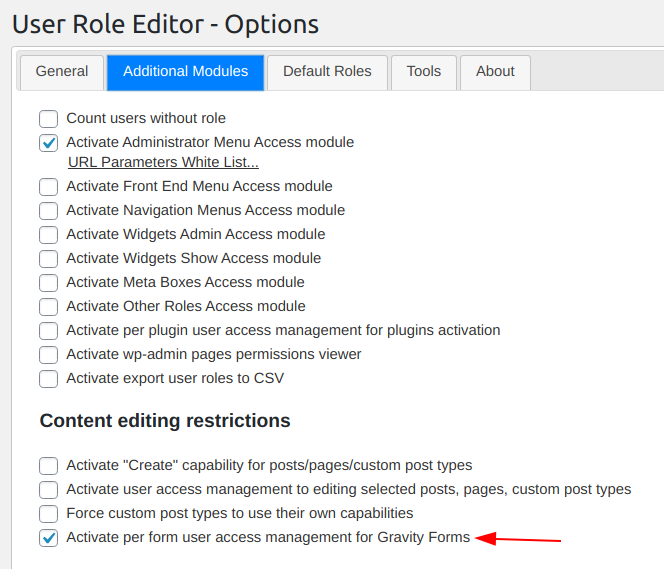
activate gravity forms access add-on
Activate Gravity Forms access add-on

After that site administrator can see the new section “Gravity Forms Restrictions” at the selected user profile. Section contains input field “Allow access to forms with ID (comma separated)”. This field will appear at profile of those users only who have some capabilities from the “Gravity Forms” capabilities list, e.g. “gravityforms_edit_forms”, “gravityforms_view_entries”, etc.

gravity forms restrictions section
Gravity Forms restrictions section

Look support video for your reference. Read more Restrict users access to Gravity Forms

Lifetime subscription plans for User Role Editor Pro

New lifetime subscription plans were added for every kind of former subscriptions: Personal, Business and Unlimited. These new subscriptions are not limited by the time. Lifetime subscription will be in action during “User Role Editor Pro” plugin life time from the moment of your purchase.

“User Role Editor” plugin is 4 years old. That were the years of the active development and users support. The plugin will continue its growth: functionality, code quality and, I hope, popularity, – the same way and even “Citius, Altius, Fortius” (faster, higher, stronger) as in the past.

Current prices for every subscription plan are available at “Prices” page and, in short, to the right, at the side bar.

With best regards,
Vladimir Garagulya.

User Role Editor version 4.5.2

Version 4.5.2 of User Role Editor WordPress plugin is available for download in both, free and Pro editions. Please update. Changes applied to the version 4.5.2 are:

  • User capabilities editor updated to support capabilities beyond the user roles. Capabilities added by other plugins directly to the users, or deleted from the user roles are available now inside User Role Editor.
  • Bug fixed – custom capabilities was not shown in User capabilities editor in some cases.
  • Opening php tag shortcut ‘<?’ found and replaced with full variant ‘<?php’ at “class-export-import.php” file to exclude syntax error on some installations.
  • Confirm compatibility of per form access restriction feature with Gravity Forms version 1.7.9.
  • Spanish translation was added for the free version. Thanks to Dario Ferrer.

Free and Pro versions compatibility

One user of free version of User Role Editor asked me via the Contact form:
– What is the process of switch from the version I am using now and the Pro Version, are there any migration issues I should be aware of?
I think that the answer I sent that user could be useful for other potential users of User Role Editor Pro. So I publish it here for your reference:
Read more Free and Pro versions compatibility

Update to the version 4.5.1

Version 4.5.1 of User Role Editor is the critical bug fix release. You did not install version 4.5 yet, as the next 4.5.1 update followed. The bug with multi-site super-admin access to the User Role Editor was fixed. Version 4.5. showed message “Insufficient permissions to work with User Role Editor” until add “manage_network_users” capability to the “Administrator” role. It is enough now to be the “Superadmin” at multi-site network.