

Forum Replies Created
-
AuthorPosts
-
Vladimir
KeymasterIf custom post types use the same capability type ‘post’, ‘Yes’, role may have access to all CPT with ‘edit_posts’ or to none of them.
But if every CPT uses own unique capability type then videos will be protected by ‘edit_videos’, ‘books’ – by ‘edit_books’, etc. You can grant access to the selected CPT at the role level in this case.
If you define CPT yourself via PHP or plugin, like “Custom Post Types User Interface” then use unique capability type for this purpose.
If CPT is defined by external source (theme or plugin) you can use “Force custom post types to use their own capabilities” option at “Settings->User Role Editor->Additional Modules” tab. Take into account that this option is applied to all existing custom post types, including WordPress built-in ‘attachments’. Correspondent roles modification would be required.KeymasterGood, that you let me know, that you found an answer.
KeymasterIf this plugin is available at wordpress.org send its download link. If it’s a paid product I need its copy for checking what permissions it uses. You can share it with support [at-sign] role-editor.com via DropBox or similar service.
KeymasterHi,
Thanks for the feedback and help with this bug isolation. I confirm it and will publish the fix with version 4.39.1 today.
KeymasterShow me screenshots what is going wrong? Does user see needed button or he gets permissions error message when try to select a template?
23/11/2017 at 10:44 in reply to: Admin profile lost some of the Categories after latest update #4438KeymasterThanks for the help with isolating this issue and testing a fix for it.
Sami, default category is assigned to the post created by super-admin for the same reason. I removed the early current user permissions checking (which were made for any wp-admin page) in v. 4.38, but did not re-check that the same permissions check is done later for the all used hooks.
If there will be a need to fix it before the next update become available, open the same v. 4.38 wp-content/plugins/user-role-editor-pro/pro/includes/classes/post-edit-access.php file, find auto_assign_term() function declaration and add current user permissions checking, like on the image below:
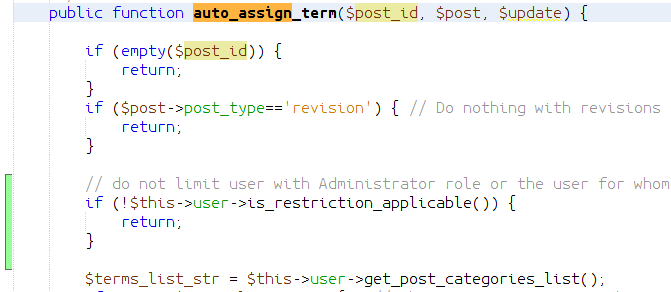
public function auto_assign_term($post_id, $post, $update) {

        if (empty($post_id)) {

            return;

        }

        if ($post->post_type=='revision') { // Do nothing with revisions

            return;

        }

        // do not limit user with Administrator role or the user for whome posts/pages edit restrictions were not set

        if (!$this->user->is_restriction_applicable()) {

            return;

        }

        $terms_list_str = $this->user->get_post_categories_list();
23/11/2017 at 02:40 in reply to: Admin profile lost some of the Categories after latest update #4435KeymasterHi,
Thanks for this information. It seems I could introduce a bug. Can you try a quick workaround?
Open v. 4.38 wp-content/plugins/user-role-editor-pro/pro/includes/classes/post-edit-access.php, go to line #470, where function exclude_terms() is defined. Replace this partif (!in_array($pagenow, array('edit.php', 'post.php', 'post-new.php'))) { return $exclusions; } $terms_list_str = $this->user->get_post_categories_list();with this version:
        if (!in_array($pagenow, array('edit.php', 'post.php', 'post-new.php'))) {
            return $exclusions;
        }

        if (!$this->user->is_restriction_applicable()) {
            return;
        }

        $terms_list_str = $this->user->get_post_categories_list();
Updated version will not apply this restriction to a user with superadmin privileges.
I included this fix to the code and it will be available with the next update. Just wish to test it with your help to be sure, that I identified a problem correctly.21/11/2017 at 16:55 in reply to: Roles that share pages with another role results in edit access to all pages #4432KeymasterTake into account this information about multiple roles assigned to a user. URE Pro looks for restriction model (Allow, Block) set for the primary role and if other value was selected for other roles, edit restrictions settings made for other role are ignored. Check if it’s your case. May be you need to grant to a user a role with edit restrictions as a primary one, or set the same restriction model for all roles granted to a user.
KeymasterHi,
Thanks for letting me know that you found a solution.
Just in case it will be helpful, URE Pro offers a custom filter ure_edit_posts_access_id_list. You can get a list of posts ID (comma separated string) allowed/prohibited for editing to current user via this hook.Access restriction type (allow/block) is available via filter ure_edit_posts_access_restriction_type.
KeymasterHi,
My test showed that Divi Role Editor shows only roles which has ‘edit_posts’ capability. Try to add it to your role and check if it will become visible at Divi Role Editor after that.
KeymasterWe need to take into account also that, when we prohibit some posts by terms ID, posts without term are still available.
KeymasterJust some information about post number counting accuracy.
“Division Access” taxonomy is used not by posts only. It is used by events also. So numbers ‘Posts->Division Access’ by categories do not show post number by this taxonomy terms, but some general number which includes events and posts together.17/11/2017 at 10:15 in reply to: Admin profile lost some of the Categories after latest update #4418KeymasterThanks for the additional details. I meet a such issue the 1st time.
Is it possible to look at your site with ‘administrator’ privileges? If ‘Yes’, send login credentials to support [at-sign] role-editor.comKeymasterI meant under “All” one of the links to the posts list views: “All, Mine, Published, Drafts”.
Unfortunately I can not repeat the main issue from your report – empty posts list.
Can you check system logs at your stage copy for any PHP/MySQL errors which could be related to this issue?KeymasterExcuse me for such a delay with answer.
My test shows that ‘All’ posts list is empty for user with ‘ECD Curator’ role just in one case when there special constant for WP Engine is not defined:
define(‘WPE_GOVERNOR’, false);You have it in a provided files copy. I just suppose that you met a problem with another (possibly stage) copy, do you?
I will continue with numbers count tests.
-
AuthorPosts