

Forum Replies Created
-
AuthorPosts
-
Vladimir
KeymasterHi,
It’s not possible using user capabilities. But it seems that you can use a filter. Tickera adds “Export PDF” tab using this filter:
add_filter( 'tc_settings_new_menus', array( &$this, 'tc_settings_new_menus_additional' ) );

function tc_settings_new_menus_additional( $settings_tabs ) {
	$settings_tabs[ 'tickera_export_mixed_data' ] = __( 'Export PDF', 'tc' );
	return $settings_tabs;
		}
You can add to this filter with larger priority (99) your own function, which will remove ‘tickera_export_mixed_data’ element from the array with the list of tabs.
Let me know if you need further help.
KeymasterHi,
Do your subsites use own domain names? Is it realized with some plugin help?
There are rare cases when POST works via redirection to a new domain name, but request for a new page does not contain POST parameters (current_role) in this case, which were send to the server initially.
KeymasterYou may try this solution:
add_action( 'registered_post_type', 'cpt_add_edit_permissions', 10, 2 );

function cpt_add_edit_permissions( $post_type, $post_type_object ) {

    if ( !class_exists( 'URE_Lib') ) {
        return;
    }

    $roles = array('administrator', 'editor');
    $lib = URE_Lib::get_instance();
    $capabilities = $lib->get_edit_post_capabilities();
    foreach( $capabilities as $capability ) {
        if ( isset( $post_type_object->cap->$capability ) ) {
            URE_Capabilities::add_cap_to_roles( $roles, $post_type_object->cap->$capability );
        }
    }

}
This code automatically adds edit capabilities to roles from the all $roles array for any registered post type.
Parameters:
$post_type – post type slug, like ‘post’,
$post_type_object – self commented.Just fill $roles array with your own roles ID, which is allowed to create new custom post types and setup this code as a must use plugin to wp-content/mu-plugins folder.
KeymasterHi,
Did you block any admin menu items for this role using “Admin menu” with “Block not selected” option?
KeymasterI asked about plugin to clarify what permission allows to create custom post type. I don’t have access to the “Toolset Types” plugin though. This solution is not suitable in case it uses some widely used capability like ‘manage_options’
URE adds user capabilities for custom post type (CPT) to ‘administrator’ role automatically only when “Users->User Role Editor” page is opening. I added custom filter
ure_cpt_editor_rolesin order to extend the list of roles to which URE will add capabilities for CPT in addition to default administrator. It will be available with the next update.URE page should be opened at least 1 time after new CPT was added. Will this update satisfy your needs?
KeymasterTry to deactivate/activate back AdRotate plugin. Some plugins re-install its user capabilities and roles on activation.
If that will not help, you have variants 1, 2 from the mentioned article.
KeymasterWhat plugin do you use to create new custom post types?
KeymasterHi Yaniv,
It’s possible to allow user to add/edit posts just with selected terms/categories. Use Posts edit restrictions add-on for this purpose.
KeymasterHi,
Let me share some info/recommendations.
When you allow someone to edit PHP code at your site, there is no sense to restrict that person somehow. You have to just trust the developer.
Having access to arbitrary PHP code execution developer can with just one line of a PHP code wp_insert_user(); create new user with ‘administrator’ role, re-login and get full permissions at the site.Any code editing should be done at the stage/development copy of the site.
In relation to the auto-redirection to dashboard, I suppose that you blocked some admin menu items for this user role via Admin menu access add-on and use ‘Block Not selected’ option. Read more carefully this part of the article.
KeymasterYes, you can, just deactivate plugin, replace files, activate plugin back.
Btw., did you check if shortcode option is active at URE Settings?
If plugin was activated locally at this subsite, then you have to check this subsite Settings, not at the network admin.25/10/2019 at 04:30 in reply to: Post Edit Access: Granting other users access to uploaded media files #6072KeymasterIs there a way of applying the “Posts Edit Access” feature “”with category/taxonomy ID”” restriction to media files just like it works for pages?
No, it will not work as you wish.
Code is built such way, that 1st it defines what posts/pages/CPT are available for editing, only then it extracts the list of attachments for which those posts are parent. Attachments are not processed as an independent post type. So general scheme will not work for them.KeymasterThere are no read-only mode in WordPress admin for custom post types including WooCommerce products. The only thing I can offer is to block/hide publishing meta box which contains ‘Update’ button. This way user will can not save any changes even if he/she makes them.
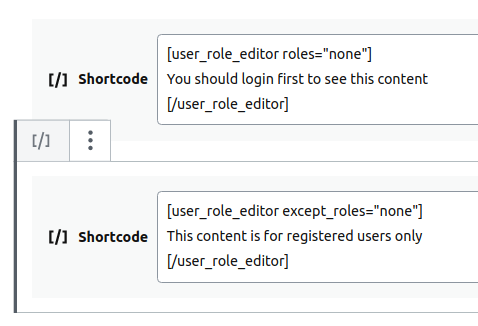
You can use “Meta boxes access” add-on for this purpose. Scroll to the ‘Product’ section and block ‘Publish (submitdiv)’ meta box for the selected role.KeymasterWe have to use a single shortcode block and insert all shortcode content to it, like at the image below:
 Keymaster
I looked at screenshot again. Clarify, do you use 2 different Guttenberg shortcode blocks: one to start [user_role_editor] shortcode and the 2nd to close it [/user_role_editor]?
KeymasterJust successfully retested [user_role_editor] shortcode with Gutenberg shortcode block. It works at my test environment. Let’s find a reason why it stopped work for you. Yes, try to deactivate all other plugins and make another test.
-
AuthorPosts
