Forum Replies Created
-
AuthorPosts
-
Vladimir
KeymasterHelp me to look at a right part of a JetPack, show screenshot of a widget you write about.
I don’t use JetPack myself, show let me know if I have to install this widget as some add-on, etc.05/05/2017 at 03:42 in reply to: Unwanted dashboard redirect when 'settings-updated' is present #3679KeymasterHi Frederick,
You can use this code to add additional arguments to allowed list for this page:
add_filter('ure_admin_menu_access_allowed_args', 'ure_allow_args_for_oxfam_options', 10, 1);

function ure_allow_args_for_oxfam_options($args) {

    $args['admin.php']['oxfam-options'] = array(
        'page',
        'settings-updated'
        );

    return $args;
}
Install it as must use plugin or add to funcitions.php file of active theme.
KeymasterOK.
KeymasterHi,
There is a special public method, which you can call to check if user can view a post or not:
URE_Content_View_Restrictions::current_user_can_view($post_id)Unfortunately, it works incorrectly for some restriction settings, as discovered recently. I work on a fix. It will be available next week.
03/05/2017 at 16:49 in reply to: Access to "user access management to editing selected posts, pages…" #3672KeymasterHi,
Add ‘ure_edit_posts_access’ to your micro-admin role.
03/05/2017 at 16:41 in reply to: Custom User Role Admin Menu Permission can't access to second layer #3671KeymasterThanks for letting me know.
KeymasterHi,
What permissions do you wish to check: edit or view?
KeymasterHi Shweta,
I work on the update. “Grant Roles” window will have 2 parts: Primary role and Other roles.
Custom filter will allow to hide “Primary role” section.I suppose to publish the update next week.
KeymasterHi,
If theme use WordPress built-in notices API then its possible to hide such notices for role using this recipe.
Unfortunately some developers show notification at wp-admin using own code and do not differentiate to whom show those notification but to whom do not show.
03/05/2017 at 04:12 in reply to: Unwanted dashboard redirect when 'settings-updated' is present #3662KeymasterHi Frederick,
Can you provide me a copy of this oxfam plugin for testing and selection an appropriate solution.
It’s possible to add its URL argument directly to URE Pro allowed list of URL parameters for this plugin (if this plugin quite popular) or, in other case, just setup custom filter which will add such parameter at your installation. I will show you a code sample then.03/05/2017 at 04:05 in reply to: Custom User Role Admin Menu Permission can't access to second layer #3661KeymasterHi,
Thanks for the feedback.
Do you use “Block not selected” option at “Admin menu” for this role? Can you show a full screenshot of “Admin menu” settings?
Does any menu item with a link started from ‘user-edit.php’ exist at your not restricted admin menu?
If ‘Edit’ link differs from one existed at admin menu by URL arguments, then URE can redirect user from such URL as from prohibited one (count it as not selected).
KeymasterHi Oli,
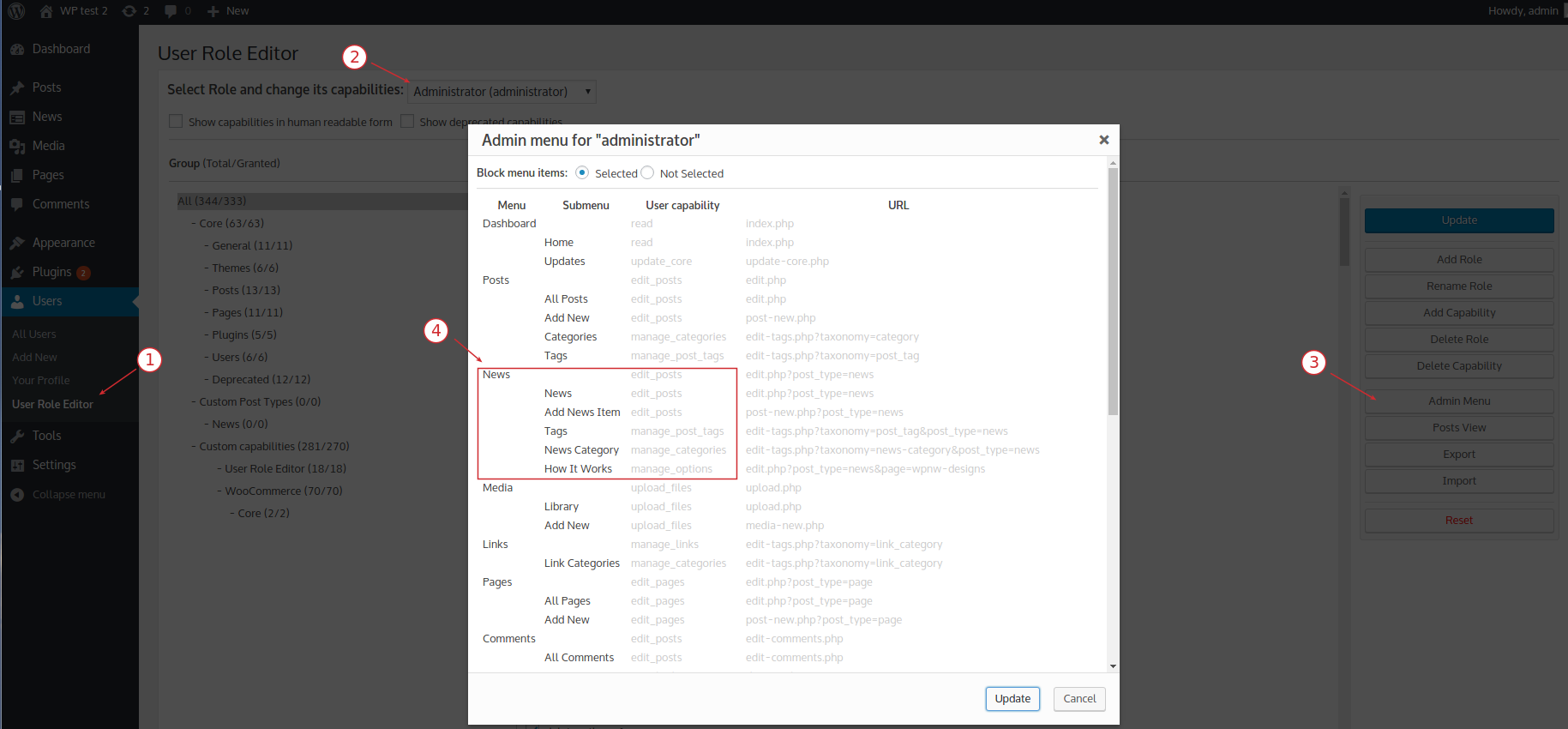
‘SP News and Widget’ plugin registers ‘News’ custom post type with the same user capabilities set as WP does for built-in posts. Look at this screenshot.
So if user can edit/create posts he should have a full access for work with news too.User Role Editor does not show capabilities for custom post type if it uses capabilities from WordPress built-in post type. That’s why you see 0 there. Capabilities are available under ‘Posts’ group in this case.
KeymasterWP does not have built-in ‘news’ custom post type. What plugin or theme creates ‘News’ menu at your site? I need that code copy to look at it and try to help you.
KeymasterHi Oli,
Some custom post types are defined a way to use WordPress built-in ‘edit_posts’ capabilities set. You can check this using Admin menu access add-on. Activate add-on, then open Users->User Role Editor, select Administrator role and open ‘Admin menu’. Look what capabilities are used for News menu. I suppose that it is an ‘edit_posts’.
02/05/2017 at 01:46 in reply to: Unwanted dashboard redirect when 'settings-updated' is present #3650KeymasterHi Frederick,
Thanks for the feedback. Yes, it’s possible to at URL parameters into “allowed” list.
Send me a full URL (without domain) in order I know exactly what WooCommerce option you change. -
AuthorPosts