

Forum Replies Created
-
AuthorPosts
-
Vladimir
KeymasterHi,
This plugin menu item “Tools->Redirection” is protected by ‘manage_options’ capability. I added ‘manage_options’ capability to the custom role and get access to the this menu item.
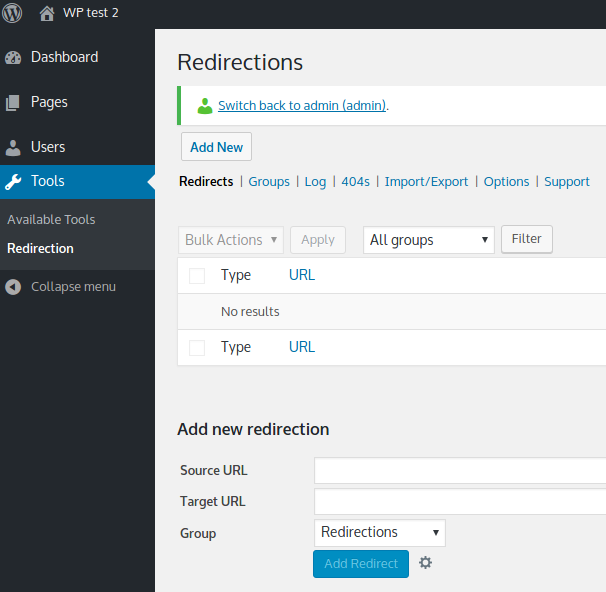
Try to deactivate all other plugins. May be some plugins hides this menu item for your role.
KeymasterI suppose it’s related to admin menu blocking settings: look if it’s your case: click here.
KeymasterHi,
What’s happening when editor tries to search?
19/03/2018 at 13:27 in reply to: How can i hide Other Roles dropdown menu from user editor, Grant Role button… #4690KeymasterHi,
1) Quick workaround. Open user-role-editor-pro/includes/classes/user-role-editor.php and comment line #193
Code will look like:$bulk_grant_roles = apply_filters('ure_bulk_grant_roles', true); if ($bulk_grant_roles) { // new URE_Grant_Roles(); }This change will be lost after every update to a new version.
2) Needs some time and PHP developer experience – find why you can not set false via ‘ure_bulk_grant_roles’ filter.
18/03/2018 at 02:34 in reply to: How can i hide Other Roles dropdown menu from user editor, Grant Role button… #4687KeymasterCode, which you showed above, should work for the users with right role. Let me know if you still have difficulties with it after checking a role ID.
It’s possible to use ‘ure_bulk_grant_roles’ filter. Return false with it to hide “Grant Roles” button. This is a quote from the URE source code:
 $bulk_grant_roles = apply_filters('ure_bulk_grant_roles', true);
 if ($bulk_grant_roles) {
     new URE_Grant_Roles();
 }
17/03/2018 at 02:02 in reply to: How can i hide Other Roles dropdown menu from user editor, Grant Role button… #4683KeymasterThis code hides ‘View’ actions at Users list from all user except user with ‘administrator’ role:
add_filter('user_row_actions', 'hide_users_view_action', 10, 1);
function hide_users_view_action($actions) {

    if (current_user_can('administrator')) {
        return $actions;
    }

    if (isset($actions['view'])) {
        unset($actions['view']);
    }

    return $actions;

}
17/03/2018 at 01:31 in reply to: How can i hide Other Roles dropdown menu from user editor, Grant Role button… #4682KeymasterHi Fotini,
Code above works for the user with ‘user-manager’ role only. Replace ‘user-manager’ with your own role ID or check if your user really has ‘user-manager’ role.
KeymasterIt seems, that wp_init_roles action fires at your site earlier, than active bbPress plugin loads its .php files.
Can you try beta version 4.42.b2 (available from the same download page after login)?
It includes a related update:
Load required .php files from the active bbPress plugin directly, as URE code may be executed earlier than they are loaded by bbPress in some cases.KeymasterDo you block some menu items for user role with “Admin menu access” add-on?
If you ‘yes’ and you use ‘block not selected’ model then URE blocks and redirects to the 1st available menu item (dashboard) any links, which are have the same base as the menu items, but have additional arguments/parameters in URL.
2 workarounds are possible:
1) Use “Block selected” model in “Admin menu” settings for this role;
or
2) go to the “Settings->User Role Editor->Additional modules” tab and click “URL parameters white list” link. Find the menu item and add for it additional URL arguments which you allow for this menu item.KeymasterHi,
In general, user should be capable to edit post to which media file is attached. It it’s true, user can edit this media file (attachment) property and delete it. ‘upload_files’ allows just to add new item to the media library.
If you turn ON the “Force custom post types to use their own capabilities” checkbox at the “Settings->User Role Editor->Additional Modules” tab, then WordPress will check ‘delete_attachments” capability instead of ‘delete_posts’. So you have to look if required capabilities from the “Attachments” group were granted to a role or user.
Some plugin can introduce a problem also. So all plugin temporal deactivation may help to isolate a reason.
KeymasterHi,
Often custom post types are defined with the same capability type – default ‘post’. That is they all use the same capabilities list: ‘edit_posts’, ‘delete_posts’, ‘publish_posts’, etc.
When you turn ON the checkbox for ‘edit_posts’ which you see under some custom post type group, you grant this capability not to this custom post type only, but to the currently selected role. Thus this role can ‘edit_posts’ for all custom post types including WordPress built-in ‘posts’. That’s why you see it is “applied to all other custom post types’.So its not a bug, its a feature.
KeymasterHi Michael,
I understand your need. May be I will add with time a workaround especially for TablePress. I can recommend nothing currently.
02/03/2018 at 05:49 in reply to: Default post category affected by individual user category/taxonomy ID settings #4643KeymasterWhile I may agree with you thoughts about user experience, I do not see currently the alternative to auto assign category to a new post created by a restricted user.
Ability to select a default category from the list of allowed categories sounds good for me. Thank for the suggestion. I will take this into account.KeymasterJust to be sure that a problem is related to User Role Editor (URE) – is a page loading faster for the same lower admin access user if you deactivate URE?
Right, if you set additional restrictions via URE add-ons, URE adds filter conditions to the related SQL queries and it adds time to the page processing if you have a lot of posts and pages.
Generally, caching plugin like W3 Total Cache or similar can help. WordPress will used the result of SQL queries from the cache instead of sending them to the MySQL server again.
Also you can revise the restrictions conditions which you use in order query checks less conditions. You can test with different criteria: allow or block. For example if block criteria leads to checking much more pages quantity, switching to “allow” criteria may enhance productivity.
KeymasterThanks for the remind and especially for your patience. I really missed this topic somehow.
I confirm that I will add this feature. I will try to make it available for testing as beta version in March, 2018.
-
AuthorPosts
