

Forum Replies Created
-
AuthorPosts
-
Vladimir
KeymasterHi Tobias,
Clarify, where do you wish to change CSS for role: at wp-admin or at the front-end?
KeymasterCurrently, the only way is to network deactivate User Role Editor Pro and activate it for selected sites separately. Then you will have separate “Settings->User Role Editor” menu for every site and separate set of URE Pro configuration options.
May be I will add with one of the future updates a custom filter which allow to change option value via code.
KeymasterHi Clara,
My test made for ‘editor’ role showed that “WPBakery Page Builder’ menu is hidden successfully.
What version of WPBakery PB do you use?
Does test user have a single role?25/11/2019 at 09:41 in reply to: Is there a way to let role “SEO editor” to work with page revisions? #6147KeymasterHi Yaniv,
I don’t see any special permissions requirement for access to revisions except one that user should can edit original page/post.
Check if your version of ‘wpseo_editor’ role contains the same list of user capabilities under the “Pages” group as ‘wpseo_manager’ does. Just in case something was be revoked.25/11/2019 at 05:45 in reply to: Is there a way to let role “SEO editor” to work with page revisions? #6145KeymasterHi,
wp_seo_editor role like wp_seo_manager role is built on the top of the ‘editor’ role. Both roles like ‘editor’ role can work with page revisions.
What option/function do you wish to remove from wp_seo_editor role?KeymasterSend site URL and admin credentials to support [at-sign] role-editor.com,
describe what CPT (menu items) you wish to make visible for your users. I will look if it’s possible to solve your task using URE Pro.KeymasterIt depends from how custom post type (CPT) is defined. WordPress core register_post_type() has ‘show_ui’ parameter. If CTP is defined with show_ui==FALSE then you will not see it, even is you administrator.
If CPT is viewable by user with enough permissions, then it’s possible to manage who can view them. Look at this article.Take into account that, some plugins use internal data structure for their records instead of WP custom post types.
KeymasterHi,
So, you wish to allow paid user to view some page by its ID.
Use Content View Restrictions add-on.
Open page 1 for edit and allow view this page only to the role 1.
Allow view page 2 only to the role 2.The important step is: assign to a user needed role after payment. You can do it manually with delay to access to a service, or automatically – you need to find appropriate action, executed after payment was finished.
KeymasterKeymasterURE works this way by design. You can revoke from a user only those capabilities which granted to him directly. Capability granted via a role, can be revoked this way:
1) revoke from user that role
or
2) revoke that capability from that role.KeymasterThanks for the provided access to the source code. There were similar error reports at wordpress.org support forum. I duplicate the answer here:
The reason of a problem is a line of code at the BuddyBoss platform plugin. Open wp-content/plugins/buddyboss-platform/bp-load.php file and look at the line #149:
apply_filters( 'all_plugins', 'bp_core_unset_bbpress_buddypress_active_all_plugins', - 1 );It incorrectly calls `apply_filters’ for WordPress core ‘all_plugins’ filter. Why do I think so? Be cause of it sends to it not array with plugins list, as WordPress itself does at includes/class-wp-plugins-list-table.php:91:
$all_plugins = apply_filters( 'all_plugins', get_plugins() );
where functionget_plugins()returns “array Key is the plugin file path and the value is an array of the plugin data”.But it sends own function ‘bp_core_unset_bbpress_buddypress_active_all_plugins’ and priority value: -1. These parameters are valid for
add_filter()function.
I suppose this is just a typo.More,
bp_core_unset_bbpress_buddypress_active_all_plugins()function which belongs to BuddyBoss Platform plugin accept a single $plugins parameter and returns it unchanged.So quick fix is replace line #149 with this valid version:
add_filter( 'all_plugins', 'bp_core_unset_bbpress_buddypress_active_all_plugins', - 1 );KeymasterHi,
Thanks for this information.
User Role Editor (URE) hides itself from not administrator users who have access to the “Plugins” page. URE uses ‘all_plugins’ WordPress filter to exclude itself from the installed plugins list.
Look at this filter official definition:This filter should take parameter of type array, not the string, as BuddyBoss sends, according to the line #2 from the stack trace:
#2 /wp-content/plugins/buddyboss-platform/bp-loader.php(149): apply_filters(‘all_plugins’, ‘bp_core_unset_b…’, -1);
URE tries unset array element for its own record in line 461:
459 // exclude URE from plugins list
460 $key = basename(URE_PLUGIN_DIR) . ‘/’ . URE_PLUGIN_FILE;
461 unset($plugins[$key]);Look at the screenshot below. I took it from PHP debugger at my test site.
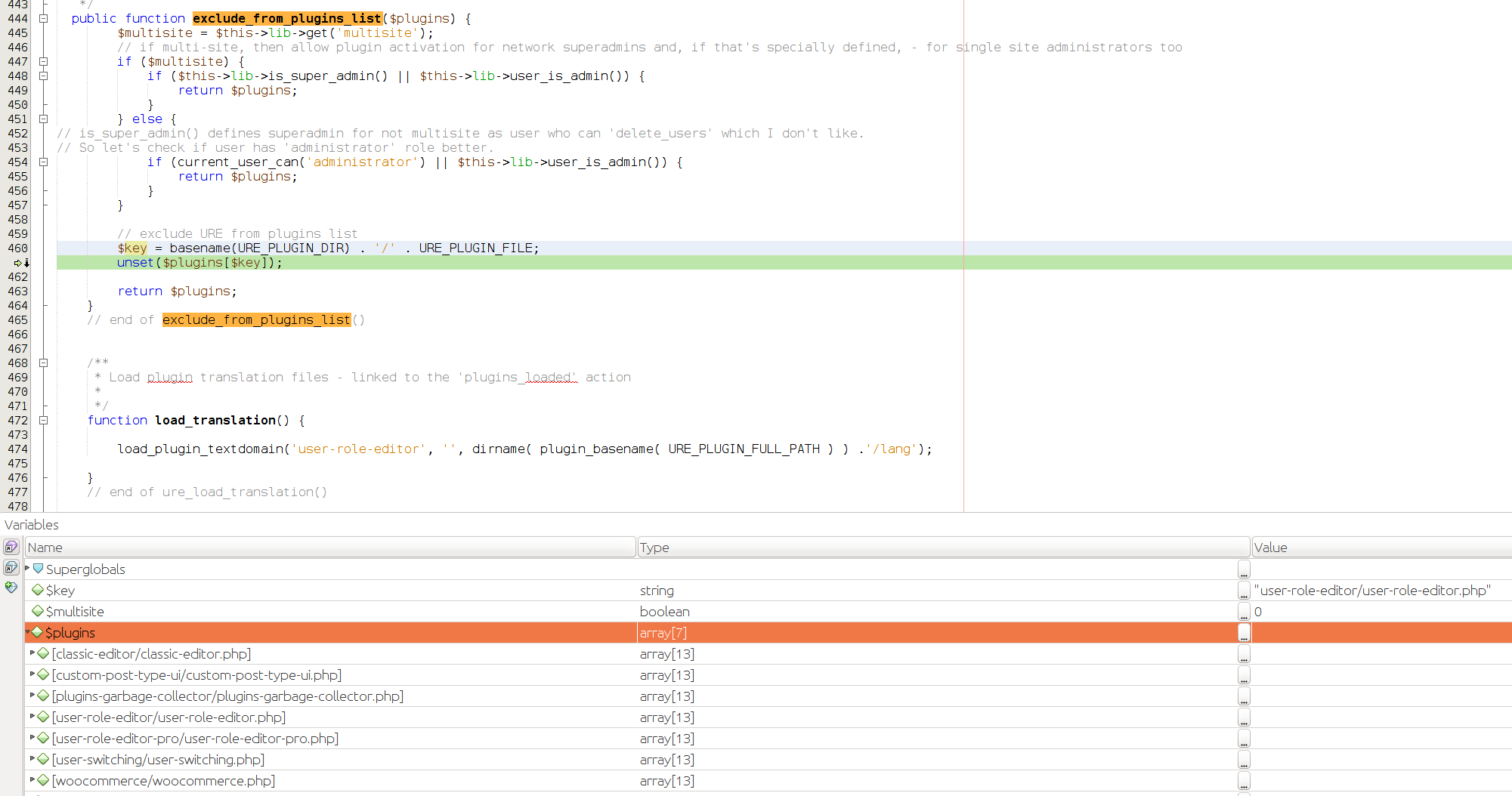
$plugins parameter contains array of installed plugins as it should by WordPress design and documentation.But at your site $plugins modified by BuddyBoss executed ‘all_plugins’ filter earlier with lower priority (-1 comparing to default 10), contains not array with plugins list, but the string ‘bp_core_unset_b…’. Finally, I see this as a reason of PHP error, raised inside URE code.
I’m ready to investigate the issue further if you can provide me BuddyBoss plugin (plus a theme if required) for testing. Share it with support [at-sign] role-editor.com via Google Drive or similar.
KeymasterTurn ON ‘Show deprecated capabilities’ checkbox at the top of URE page to see ‘edit_files’ capability.
KeymasterHi,
Yoast SEO checks ‘edit_files’ capability before allow user to work with its ‘File Editor’.
Take into account that any mistake in .htaccess file may lead to site blocking. You need to think twice before allow direct file editing at the live site.
Btw., ‘edit_files’ allows to edit inside WordPress themes and plugins file.
KeymasterThanks for letting me know.
-
AuthorPosts
